A reminder bot that speaks my language
Write it a plain sentence - "call mom tomorrow at 10:00" - and it pings you at the right second. Recurring schedules, snooze buttons, a web UI for the complex stuff. Built for myself, in daily use.
Try it yourself: message @etchnow_bot on Telegram ↗
About
Skeddy died on me, so I rebuilt it
I ran my life on a reminder bot: taxes, calls, "check the pie in the oven". When it got unreliable, I spent an evening on the sofa and shipped my own - natural-language reminders in English and Ukrainian, no forms, no date pickers. You just type.
If the text has a recognisable time, it becomes a reminder. If it doesn't, it's saved as a note - nothing you send it is ever lost.
Type
Personal tool
Built with
Next.js 16 · Telegram Bot API
Data
Vercel Postgres · Drizzle
Delivery
Upstash QStash
How it works
From a sentence to a ping
The hard part isn't parsing - it's firing at the exact second on a serverless platform that can't sleep. A webhook parses the message, and QStash calls back at the due moment.
01
You type
"taxes at 11:30", "drink water every day at 8:00"
02
Webhook parses
chrono-node (uk + en) finds the date; keywords map to RRULE
03
Saved
reminder → Postgres; no time found → note
04
QStash fires
callback at the due second - serverless can't sleep, so it doesn't
05
You get pinged
with snooze buttons; recurring ones reschedule themselves
In practice
Snooze from the notification
Every reminder arrives with inline buttons - +10 min / +1 hr / +3 hrs / tomorrow / turn off - so rescheduling is one tap, not a new message.
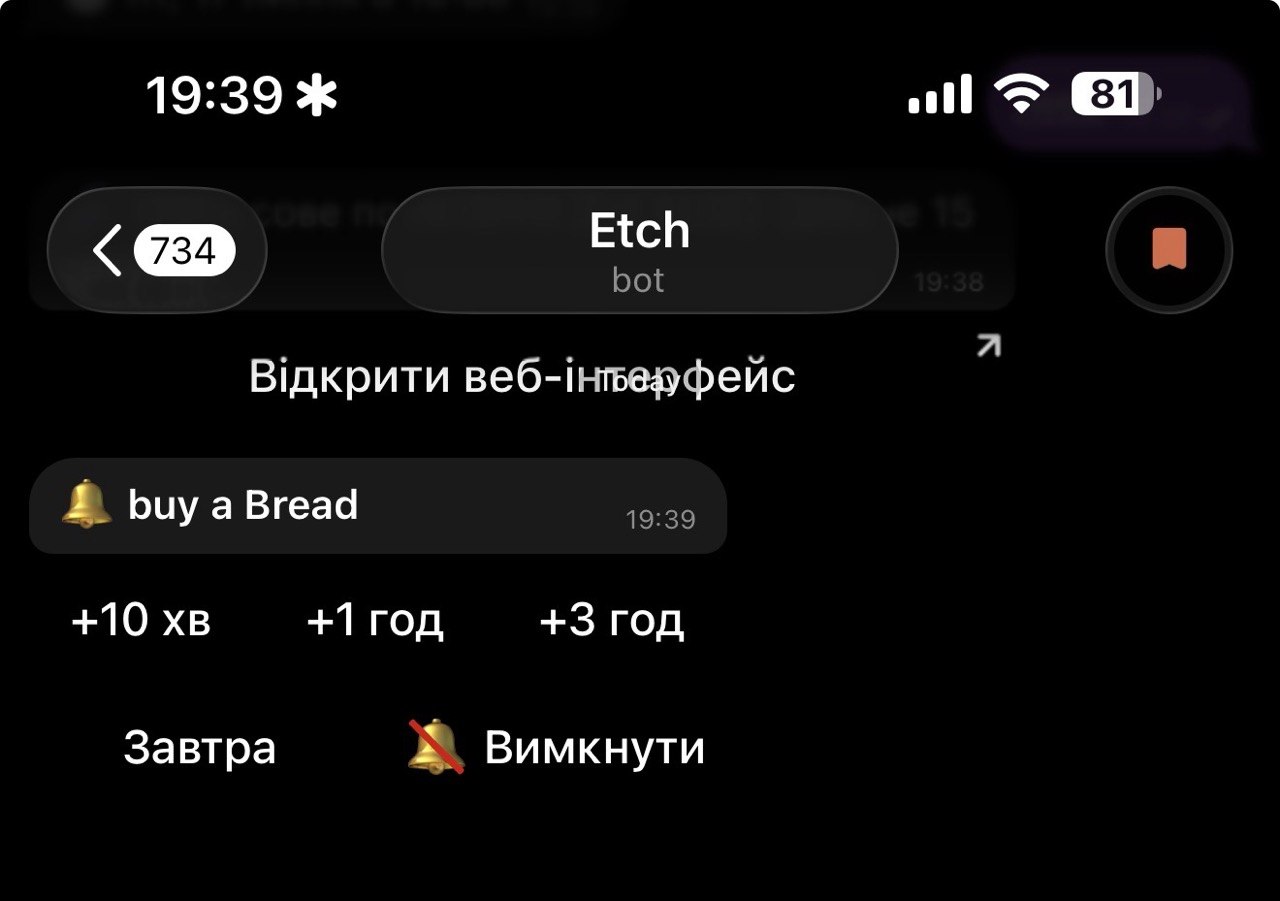
A fired reminder in the chat - snooze or dismiss without typing a word.
Web interface
A web UI you log into from the chat
Complex schedules are easier on a big screen. Send the bot /web and it mints a one-time 15-second token - the link logs you straight in, no password, no signup. From there you create, edit, toggle and delete anything.
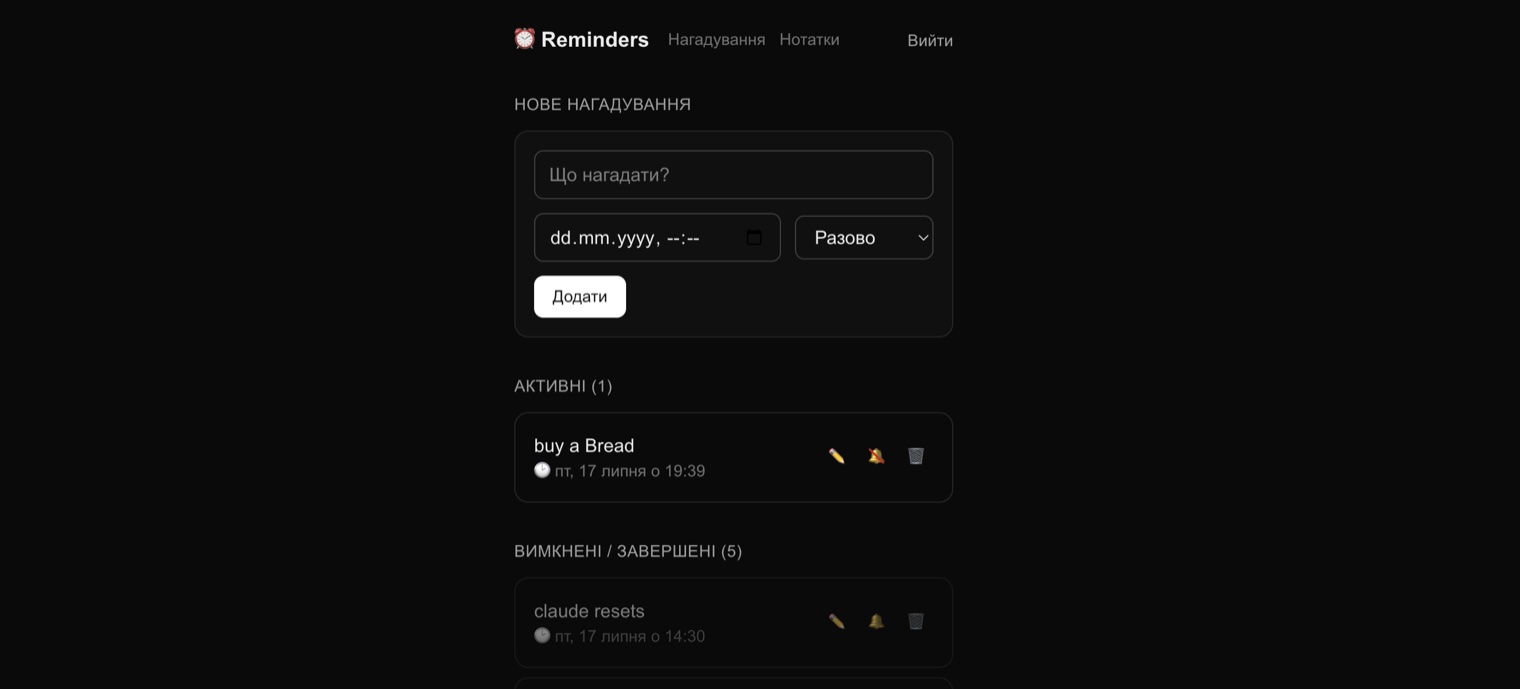
The web UI - quick-add form on top, active and finished reminders below.
Features
What it does
Natural language, two languages
"call mom tomorrow at 10am", "pick up the parcel in 2 days" - English and Ukrainian, parsed the same way.
Recurring schedules
"every day at 8:00", "on the 1st of every month", "every Sunday at 13:00", "every 10 minutes" - keywords compile to RRULE under the hood.
Notes by default
Text without a recognisable time is saved as a note instead of being rejected - the bot never answers "I don't understand".
Snooze on every ping
+10 min / +1 hr / +3 hrs / tomorrow / turn off - inline buttons on each fired reminder.
One-time-token web login
/web in the chat → 15-second magic link → JWT session. No password ever existed.
Exact-second delivery
No cron polling every minute - QStash fires a signed callback at the due moment, and recurring reminders reschedule the next occurrence.
Talk instead of type
Send a voice note - it's transcribed and parsed like any typed reminder. Auto-detects the language.
Send it a file
Drop in photos or files - stored for free by Telegram file reference and shown in the web dashboard.
Under the hood
One deploy, zero servers to babysit
Next.js App Router gives the bot webhook, the delivery callback and the web UI a single Vercel deploy. Postgres (Neon) via Drizzle holds the reminders; every incoming request is verified - Telegram's secret header on the webhook, QStash's signature on delivery.
Same story as the rest of this site: designed and built by me, with Claude doing the typing.
Two additions since: Groq Whisper handles voice transcription, a new attachments table in Postgres stores each file's Telegram file_id and kind, and /api/media/[id] is an auth-gated proxy that resolves an id back to a fresh Telegram URL and streams the bytes - no file ever touches disk on my end.
Addendum
Now it also listens, and catches whatever you throw at it
Voice input. Send the bot a voice note and it's transcribed with Groq's Whisper (whisper-large-v3), then run through the exact same natural-language parser as typed text - a voice message becomes a reminder or a note automatically, hands-free. The bot echoes back what it heard so you can catch a bad transcription before it turns into the wrong reminder. Language is auto-detected per message - Ukrainian, English, or mixed - no language lock.
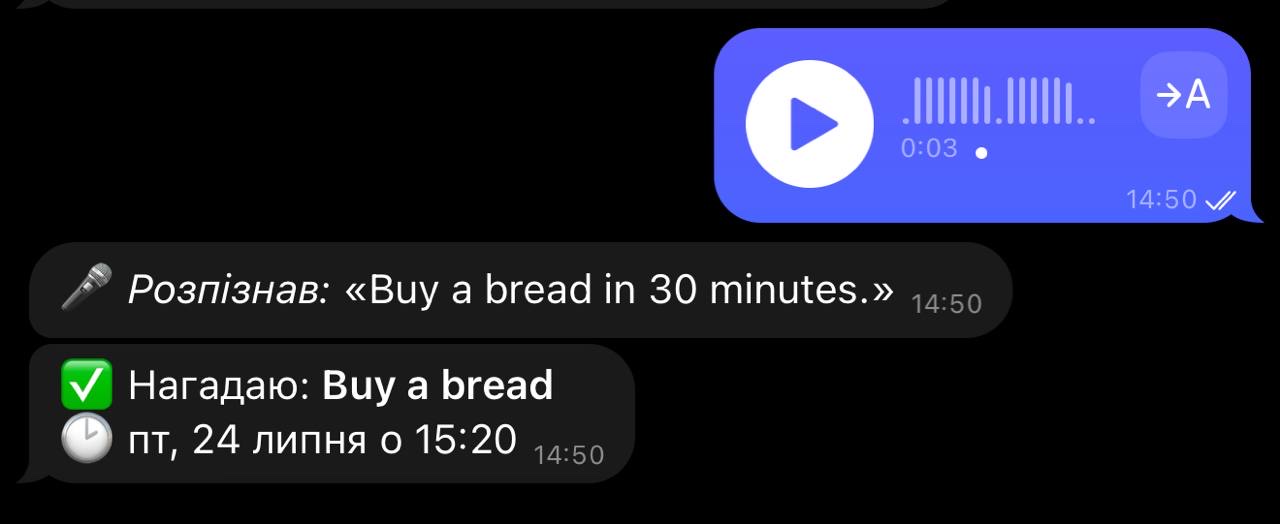
Voice note in, transcription echoed back, reminder set - three messages, no typing.
File attachments. Send a photo, document, audio or video and it's saved as a note - any caption becomes the note text - and shows up in the web dashboard: photos render inline, video and audio get players, documents appear as download links.
Built for me - but I like talking shop